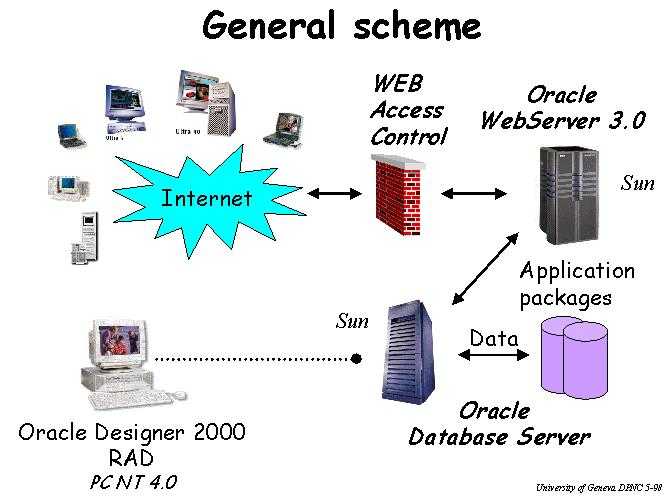
The concept of the database (DB) for silicon microstrip detectors in the SCT Central Cluster in ATLAS is quite simple. Since the large scale production is coming soon, the aim is an access from anywhere to the data and a capability to sort and report on a great number of detectors. More precisely data which are internal to Oracle and pictures at any URL link can be accessed without any restrictions.
The access to the DB is limited to the authorized people in order to keep secure informations.
One of the important features of this Oracle DB is a great flexibility allowing to add functionalities and to improve the data structure.
This report is supposed to help people to access to the DB describing the tool, the functionalities and the access.
The communication is established from a Web Browser like Netscape Navigator to the URL of the detectors database.
An Oracle Webserver 3.0 is responsible to manage the http request from a Web browser client to the detector database.
When receiving a http request, the Webserver transmits the request to an Oracle database server 7.3, where the Webdatabase application and the detectors data are stored. The database server then responds to the Webserver request and sends the corresponding recorded set result in a wrapped html format. The Webserver then sends the html result of the client http request to the Web client program.
The Oracle Designer/2000 Rapid Application Development tool was used to develop this Web application. This has provided a great flexibility of defining a prototype design and an appreciate value to generate the application code.
The design phase has produced the following Entity-Relationship in order to cover the needs of the users.
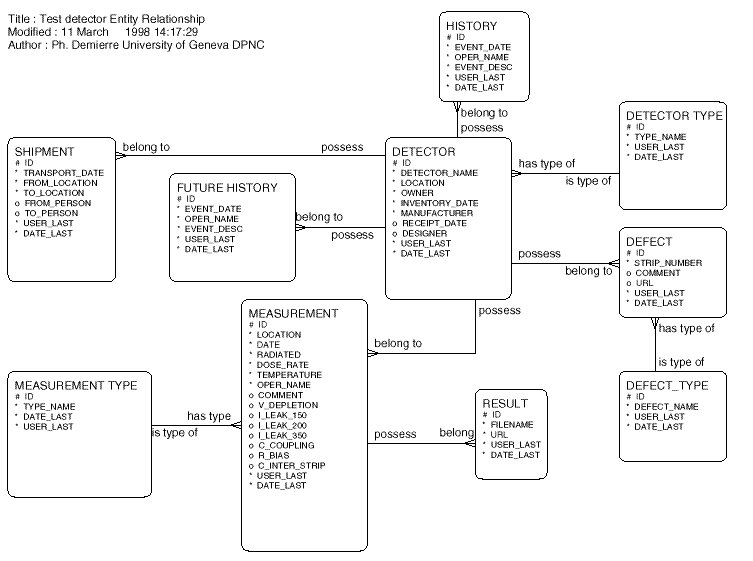
After the design cycle, Designer/2000 was used to generate and to install on the Oracle database server, the needed PL/SQL packages. These packages are reponsible to get and/or put the data in the database and to wrap these data with an html layer.
Two types of restricted access (see figure below) were defined for an extended use through the ATLAS SCT collaborators. One acces is restricted to read only and the user access is defined as: web_det. The other access dedicated to detector responsibles of each institution in the Central Cluster working group allows reading, adding and changing data. In this case the user access is defined as: web_app.
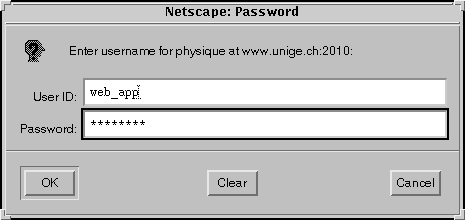
For any person who would like to know the password to access, they are
invited to send an email to the person mentioned on the welcome page of the
detector's database located at:
Each access is of course registered in a logfile describing each command
performed by the user. A report of the logfile histories is done every
day. As for most of the computing system a back-up of the data is also
performed every night.
The general scheme and link of the DB is described as on entity-relation picture above. All types of link are referred directly or undirectly to DETECTOR for which the data have to be set first.
When starting from the main menu, two possibilities are offered to find the list of detectors: either by specifying criteria on the DETECTOR entries itself or selecting criteria on the MEASUREMENT entries. For instance a selection on the range of the current value could be done. By default, if no criteria is given, all detectors will be listed. For each detector specific entries could be filled for:
Page example of the detector list and data:

For each of the entities a new record can be added.
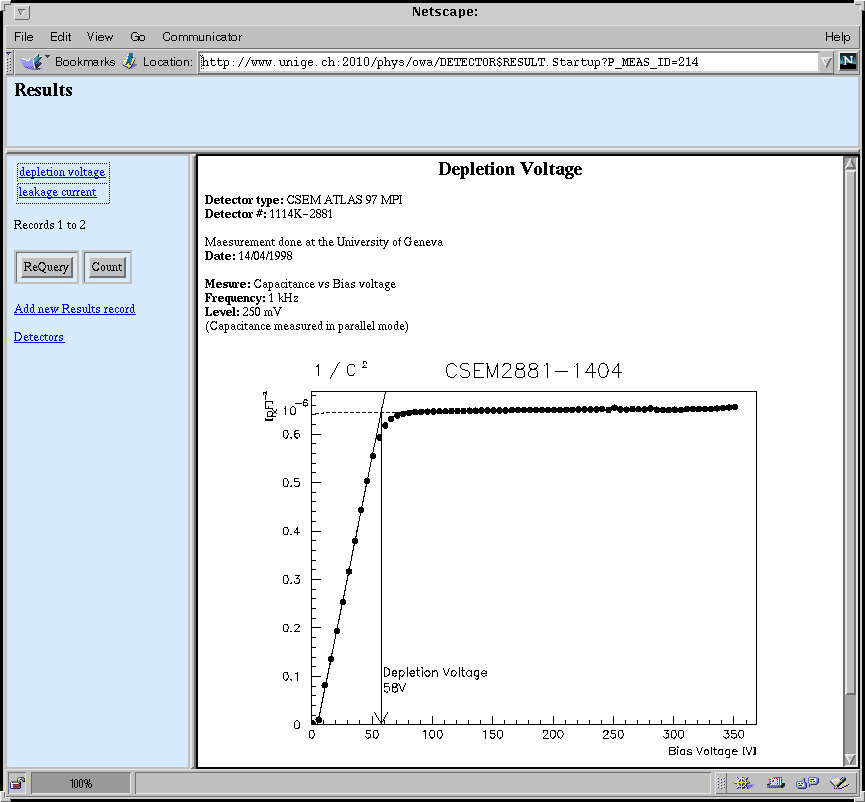
One of the specificities of this DB is to set a link to any existing URL on a Web-server. In the strucure of this DB there are possibilities to set URL link to exisiting plots for the measurement and also to existing pictures for defects (see figures below). It is under responsability of each institute to set coherent link to there own web-server.
Page example of a coupling capacitance plot exhibing the depletion voltage:

|
Operations allowed |
|
|
User web_app |
User web_det |